Getting Started with eBill
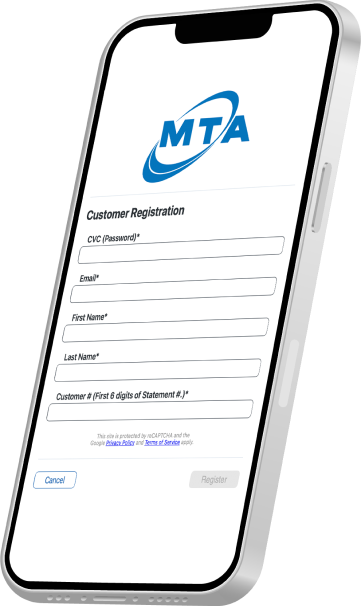
To sign up for eBill, you will need your CVC & Customer #, the email associated with your account and the account holders first and last name. Use the guide below to acquire this information:
Required Member Information
All required information pertains to the account holder of record.
CVC & Customer #
If you do not know your CVC (verbal password) and your Customer # (first 6 digits of your Statement #), then call MTA Billing at (907) 745 - 3211 option 1, option 1.
If you don’t know or have access to the email associated with your account, fill out this form:
Name
First and last name of the account holder of record.
Need Help?
Call MTA at (907) 745-3211.
You can also review our user guides for additional information:
Step-by-step Video Guide to Register and Enroll in Auto Draft (Auto Pay)
Frequently Asked Questions
Your CVC is the verbal password you set up on your account and the one used when contacting our support or billing team. If you don’t know your CVC (verbal password), you can call MTA Billing at (907) 745 – 3211.
No! Your CVC (verbal password) is only needed to verify your identity. You must create a new password, containing:
- At least 12 characters
- At least 3 of the following:
- Lower case letters (a-z)
- Upper case letters (A-Z)
- Numbers (0-9)
- Special Characters (e.g. !@#$%^&*)
Your Customer # is the first 6 digits of your Statement #. You can access this by navigating to your latest billing statement and looking in the upper right corner.
Yes. Enroll in the eBill and register Auto Draft to make automatic payments. If you are having trouble signing up online or still need assistance, please call our billing department at (907) 745-3211.